

Appearance
EC Store Installation
Browse our platform-specific guides, or follow the general instructions below to add EC Store to your website.
General Information
EC Store is built using modern Web Components, including Custom Elements.
This approach makes it highly portable, allowing you to embed the filter shop into virtually any website that supports custom HTML and JavaScript.
Basic Integration
To install EC Store, add the following to the HTML of your desired shop page:
html
<!-- Load EC Store -->
<script src="https://d1vc0si56f5gt.cloudfront.net/ff-plugin.umd.min.js"></script>

<!-- Show EC Store -->
<ff-plugin></ff-plugin>
Placement Notes
- The
<script>tag should be placed at the top of the<body>tag, to ensure proper loading order.
WARNING
Avoid placing the script tag in the head section of your HTML.
Scripts loaded in the <head> may execute before the DOM is ready, which can prevent your custom element from being properly registered or rendered. Placing the script in the <body> ensures it runs after the browser has started parsing the page content.
Final Step: Deploy Your Changes
Once you've added the script and element to your desired page, you will see an alert titled Your Almost There!
What does the alert look like?
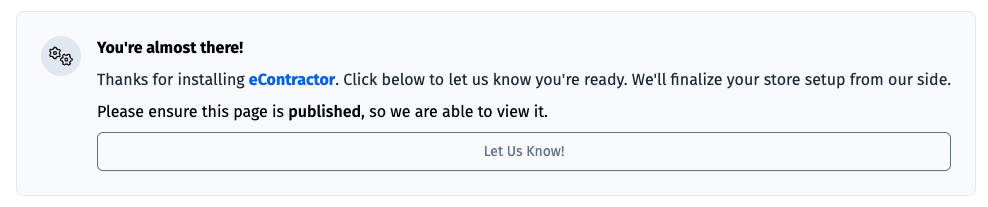
Make sure to publish or deploy the updated page so that its live and publicly accessible.
WARNING
⚠️ Please ensure the page is Live before selecting the Let Us Know button, as our team will need to be able to access the page.
Once deployed, go ahead and click on the Let Us Know button. Our team will then get your EC Store live as soon as possible!
TIP
🚀 Once installed and deployed, you’re ready to start driving traffic to your shop page and begin selling!
Customize EC Store
After EC Store is installed, users with admin access can update the store's primary color from the EC Store account area.
See Customizing EC Store for details on the theme settings panel and color options.
Need Help?
If your site uses a platform like WordPress, Wix, or SquareSpace, or if you’re unsure where to place the snippet, check out our platform-specific guides or contact our support team. We're happy to assist with integration or custom setups not covered in the docs.