

Appearance
Customizing EC Store Colors
After EC Store is installed, users with admin access can customize the store's primary color from the EC Store account area. This lets you better match the store to your company's website without changing the embed code.
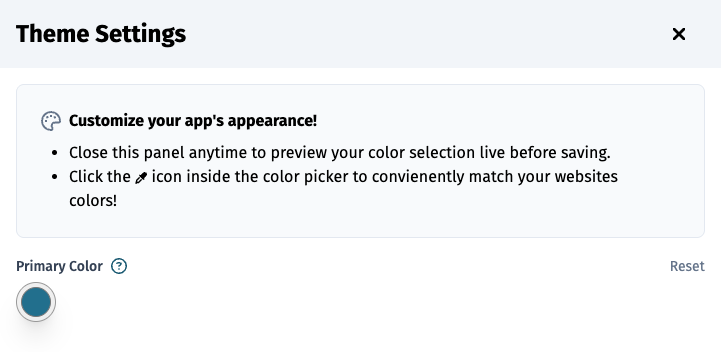
Open Theme Settings
- Sign in to EC Store.
- Look for the paintbrush button fixed to the right side of the screen.
- Select the paintbrush button to open Theme Settings.
TIP
The paintbrush button only appears for users with admin access.
Primary Color
Use Primary Color to choose the main brand color for EC Store.
This color is applied to key parts of the store, including important buttons, icons, highlighted text, and loading indicators.
For example, a blue-green option is:
css
#0f6f8fWhen you choose a primary color, EC Store automatically creates a full color palette from that selection. This keeps lighter and darker states consistent across the store.
Preview Before Saving
You can close the panel at any time to preview the selected color throughout the store before saving.
Use this to check important areas such as:
- Product cards
- Add to cart buttons
- Cart and checkout actions
- Navigation highlights
- Loading indicators
Match Website Colors
The color picker includes an eyedropper option in supported browsers. Use it to pick a color directly from the website, such as a logo, header button, or brand accent.
If your website already has a strong brand color, choosing that same color usually creates the most seamless experience.
Reset to Default
Use Reset to return the primary color to the default EC Store color.
This is helpful if a selected color does not provide enough contrast or no longer matches the website.
Save Changes
Click Submit after choosing the color you want to use.
WARNING
Submitting a new primary color updates EC Store for all customers who visit your store.
Recommended Color Tips
- Choose a color that already appears on the company's website.
- Avoid very light colors for the primary color because button text may be harder to read.
- Strong blues, teals, greens, and deep brand colors usually work well for contractor websites.
- Preview the store before saving so you can confirm buttons and highlights are easy to see.